Security recommendations
In order for the Data Gateway to operate securely, there is a set of measures that need to be taken by the implementer of the system. This section explains the background of these measures and gives recommendations on how to implement them.
Security context and security measures expected by the environment
When using the Data Gateway application in an edge computing setup, it is important to understand the setting that the application has been designed for. The development of the application, all security considerations and threat assessments are based on the scenarios and the environment described in this document. If the application is used in a different scenario or environment, the implementers of security will have to assess the impact of the changed security context and adapt their security strategy accordingly.
Machine data collection scenario
In this scenario the NERVE edge node is installed in a machine or in a production environment (see NERVE security context: machine builder scenario, factory owner scenario). The device is connected to sensors and possibly a PLC as well as to the IT network of the operator (machine operator, factory owner). The Data Gateway is deployed as a NERVE workload and connected to the sensors and/or actuators as well as possibly to the PLC (or soft PLC) to collect data via the supported protocols. The data is then provided to applications running on the edge device for preprocessing. The preprocessed data as well as possibly the raw data from the sensor/actuators or PLC might also be transmitted to higher level applications in the IT network, the OT network or the cloud.
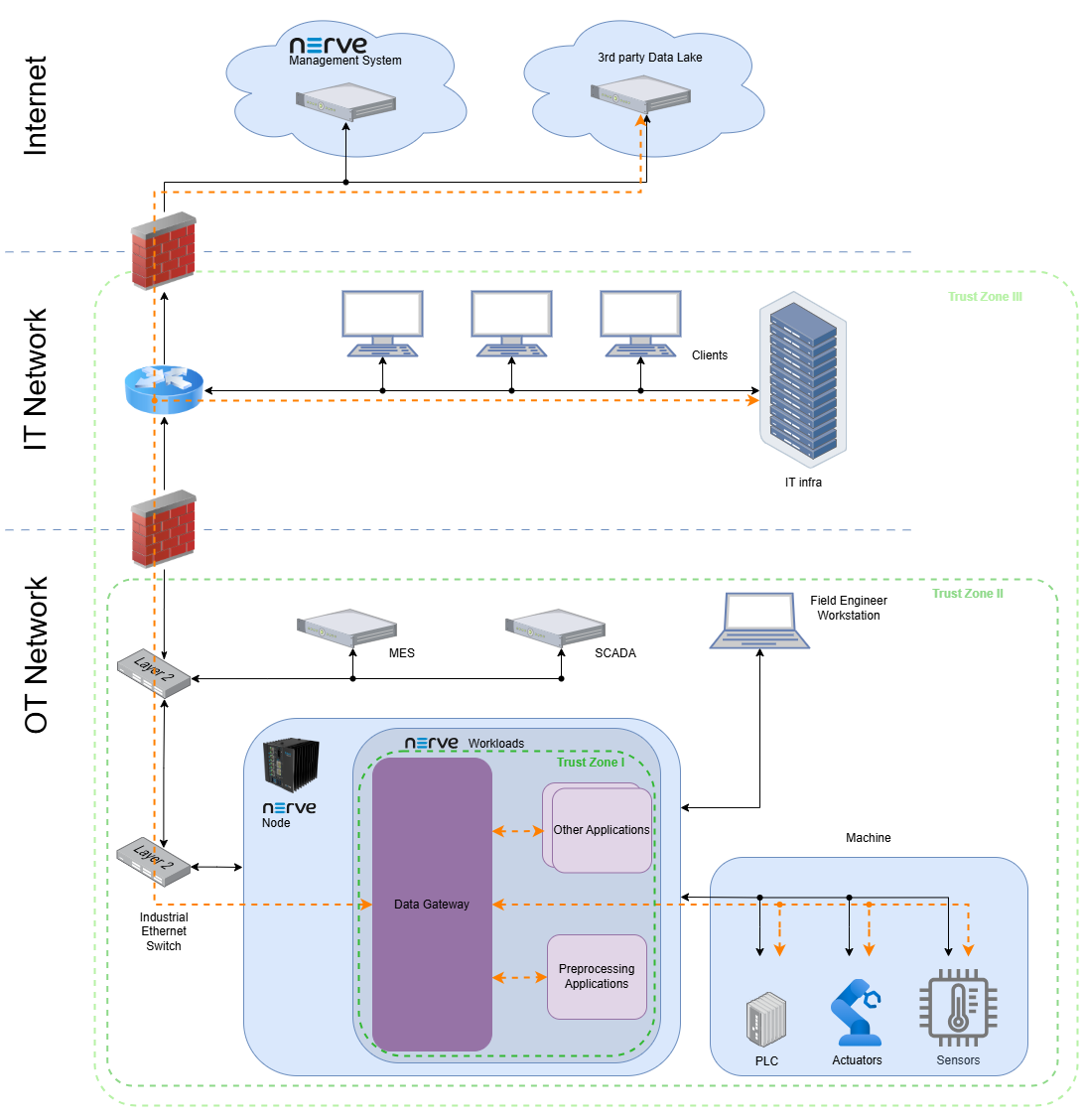
The diagram shows the network topology (black connections) as well as the flow of data between the Data Gateway and its environment (orange). The environment is described in detail in the NERVE security context.
Trust zones
The trust zones define logical segments of applications and devices of a similar trust level. A component can trust each other component that lies within the same trust zone, but must take precautions when interacting with components from another trust zone. From a data point of view this implies that data coming from a different trust zone is always validated and precautions are taken regarding common attacks (e.g. rate limitation to avoid DoS attacks).
With reference to the Data Gateway, the innermost trust zone is the NERVE node. Applications running on the same node can be trusted if the setting complies with the NERVE security context, security recommendations, defense in depth strategy, etc. Data coming from outside that trust zone must be validated. The validation happens ideally in the Data Gateway, but it can be forwarded without validation if each recipient performs a validation.
Configuration by trained and trusted operators
The Data Gateway is only attached to the physical network ports explicitly needed for data communication through proper configuration of the workload according to the exact setup. The Data Gateway as well as the NERVE node are not directly exposed to the Internet, as there must be a firewall that only allows the necessary outgoing connections (originating from the NERVE node). The workload configuration is only performed by regularly trained operators that are aware of the security context and the implications that the configurations have.
Defense in depth strategy
As per IEC62443, all compliant systems shall implement a defense in depth strategy.
For a successful implementation of a defense in depth strategy in the overall system, it is necessary for the user to understand the capabilities of the Data Gateway and threats assessed by these capabilities.
Refer to the respective sections for more information.
External interface security checklist
Use this checklist during commissioning, updates, and periodic security reviews.
OPC UA
- Use
SignAndEncryptacross trust boundaries. - Use accepted security policies and avoid
Noneon untrusted networks. - Configure server identity verification using CA certificates.
MQTT
- Enable TLS for external brokers and keep
tlsInsecuredisabled in production. - Prefer TLS 1.3 where available (TLS 1.2 minimum otherwise).
- Configure
rateLimitfor every subscribed topic. - Minimize wildcard use (especially
#) and review retained-message behavior.
Configuration intake
- Enable authenticity and integrity verification in production.
- Verify successful signature validation through audit logs.