Configuration File
Core Concept
The Nerve Data Gateway is a tool that automatically fetches data from one or multiple data sources via a certain protocol and sends the data to one or multiple data sinks via a (usually different) protocol. The application is therefore usually used to achieve one of the following (or a combination of them) three tasks:
- Data Aggregation: Collecting data from multiple sources and sending it to a single sink.
- Data Distribution: Collecting data from a single source and sending it to multiple sinks.
- Protocol Translation: Transferring data from a data source to a data sink where the sink supports a different protocol than the source.
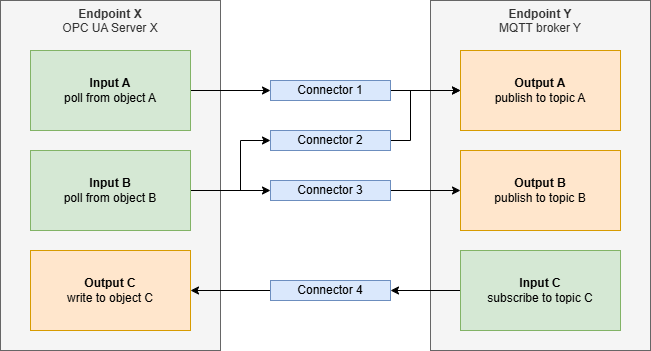
In terms of configuration, the Nerve Data Gateway uses a concept of Inputs, Connections and Outputs to represent the desired data flows. The following terminology is used for the entities that make up the configuration:
- Endpoint: A network endpoint that the Nerve Data Gateway can connect to. By specifying an endpoint, the Data Gateway will be able to connect tho this external entity (to fetch or send data via Inputs and Outputs). An example of an endpoint would be a MQTT broker connection.
- Input: An entity that is attached to an endpoint and actively fetches or passively receives data from the data source that is represented by the endpoint. An example of an Input would be a OPC UA polling client.
- Output: An entity that is attached to an endpoint and actively sends (or passively provides) data to the data sink that is represented by the endpoint. An example of an Output would be a MQTT publisher.
- Connector: An entity that connects an Input to an Output and results in the data that is entering the Nerve Data Gateway via a certain input, to be forwarded to the connected Output (and therefore the external data sink that is represented by the Output). This ultimately defines the data flow.
Using this concept for configuration should provide a high degree of flexibility (connect any data source to any data sink, allowing aggregation and distribution) while minimizing the complexity of the configuration. The following is a diagramm that illustrates the described concept:
The following is a list of restrictions and best practices that should be considered when creating a Nerve Data Gateway configuration. This is not a complete list, but a summary of the most important points. For details refer to the related chapters in the specification of the configuration file below.
- Every connector connects exactly one Input to exactly one Output, but every Input and Output can be used by multiple connectors (for data aggregation or data distribution).
- For maintainability it is recommended to avoid duplication which means using the same endpoint for multiple inputs and outputs if applicable. E.g. if data should be polled and subscribed from the same OPC UA server, it is recommended to use a single endpoint for both inputs (if applicable).
File Name
The configuration file must be named config.json before it is packed into a .zip archive and applied to the Data Gateway via the apply configuration mechanism provided by the Nerve platform.
If the file uses a different name, it will not be detected by the Nerve Data Gateway and therefore not be applied.
Top Level Structure
The configuration file uses JSON syntax. On the top level it has 3 properties:
| Parameter | Required | Valid Values | Comments |
|---|---|---|---|
| version | x | string (one of):
|
Version string to allow updates of the config file schema in the future |
| endpoints | x | array: see chapter Endpoints | Array of all endpoints |
| connections | x | array: see chapter Connections | Array of all connections |
Example:
{
    "version": "1.0",
    "endpoints": [],
    "connectors": []
}
Endpoints
The general description of the endpoint is done via the set of parameters specified in General. Those parameters are available for every endpoint. Additionally, every type of endpoint has a set of specific configuration parameters that are only available for the particular endpoint type.
General
Each endpoint has the following parameters:
| Parameter | Required | Default | Valid Values | Comments |
|---|---|---|---|---|
| id | x | - | unsigned integer (32 bit) | Identifier - must be unique among all endpoints |
| name | x | - | string | Human readable name of the endpoint |
| description | - | "" | string | Human readable description of the endpoint |
| endpointType | x | - | string (one of):
|
Type of the endpoint |
Inputs
For every input, the following parameters are available. Furthermore there are additional parameters available depending on the type of input. Those are described in the subsections of the respective endpoints.
| Parameter | Required | Default | Valid Values | Comments |
|---|---|---|---|---|
| id | x | - | unsigned integer (32 bit) | Identifier - must be unique among all inputs of the endpoint |
| name | x | - | string | Human readable name of the input |
| description | - | "" | string | Human readable description of the input |
| inputType | x | - | string (one of):
|
Type of the input |
Outputs
For every output, the following parameters are available. Furthermore there are additional parameters available depending on the type of output. Those are described in the subsections of the respective endpoints.
| Parameter | Required | Default | Valid Values | Comments |
|---|---|---|---|---|
| id | x | - | unsigned integer (32 bit) | Identifier - must be unique among all outputs of the endpoint |
| name | x | - | string | Human readable name of the output |
| description | - | "" | string | Human readable description of the output |
| outputType | x | - | string (one of):
|
Type of the output |
MQTT Client
For endpoints with type set to mqtt-client, the following parameters are available:
| Parameter | Required | Default | Valid Values | Comments | |
|---|---|---|---|---|---|
| url | x | - | string (valid mqtt url):
| URL of the MQTT broker | |
| reconnectInterval | - | 5 | integer: 0-86400 | Interval (in seconds) to be used before every new connection attempt in case of unexpected connection loss | |
| version | - | 5.0 | string (one of):
| MQTT version to use for the connection | |
| clientID | - | string | MQTT client id to use when connecting | ||
| websockets | - | false | boolean | MQTT over websockets (enable / disable) | |
| login | - | see below | object (see below) | Credentials to authenticate at the broker (if login is not provided no authentication is performed) | |
| login | username | - | None | string | Username to authenticate at the MQTT broker |
| username | - | None | string | Username to authenticate at the MQTT broker | |
| security | - | see below | object (see below) | Security settings | |
| security | tlsEnabled | - | false | boolean | Enable / disable TLS/SSL |
| ca | - | None | string | Filename of the CA certificate file (pem format, used to verify the broker certificate) | |
| certificate | - | None | string | Filename of the client certificate used for the connection (pem format) | |
| key | - | None | string | Filename of the key file used for the connection (pem format) | |
| keyPassword | - | None | string | Password for the key file | |
| tlsVersion | - | 1.3 | string (one of):
| Version of TLS to use for the connection | |
| tlsInsecure | - | false | boolean | Enable / Disable insecure TLS (broker certificate is not verified if tlsInsecure is enabled) | |
| advanced | - | see below | object (see below) | Advanced MQTT connection settings | |
| advanced | keepAlive | - | 60 | integer: 0-65535 | Interval (in seconds) between keep alive messages |
| cleanSession | - | false | boolean | Enforce a clean session on connection (if true) | |
| willTopic | - | None | string | Topic for the last will testament (LWT) message | |
| willMessage | - | None | string | Content of the LWT message | |
| willQoS | - | 1 | integer: 0-2 | Quality of service for the LWT message | |
| willRetain | - | false | boolean | Weather or not the broker shall retain the LWT message | |
| inputs | - | [] | array | Array of inputs (input type mqtt-subscriber) | |
| outputs | - | [] | array | Array of outputs (output type mqtt-publisher) | |
Example:
{
    "id": 1,
    "name": "MyBroker",
            "description": "Local MQTT Broker",
    "endpointType": "mqtt-client",
    "url": "mqtt://localhost:1883",
    "version": "5.0",
    "clientID": "NerveDGWClient",
    "login": {
        "username": "user",
        "password": "password"
    },
    "security": {
        "tlsEnabled": true,
        "ca": "mqtt_ca.pem",
        "certificate": "mqtt_cert.pem",
        "key": "mqtt_key.pem",
        "keyPassword": "password",
        "tlsVersion": "1.3",
        "tlsInsecure": false
    },
    "websockets": false,
    "advanced": {
        "keepAlive": 60,
        "cleanSession": true,
        "willTopic": "client/disconnect",
        "willMessage": "Client has disconnected",
        "willQoS": 1,
        "willRetain": false
    },
    "inputs": [],
    "outputs": []
}
Inputs
In addition to the general input parameters, the mqtt-subscriber input has the following parameters:
| Parameter | Required | Default | Valid Values | Comments |
|---|---|---|---|---|
| inputType | x | - | string (one of):
|
Type of input |
| messageFormat | x | - | string (one of): | Format of the message payload |
| topics | x | - | array | Array of topics (see table below) |
A topic has the following parameters:
| Parameter | Required | Default | Valid Values | Comments |
|---|---|---|---|---|
| topic | x | - | string (valid topic) | Topic to subscribe to (supports wildcards + and #) |
| qos | - | 0 | integer: 0-2 | Quality of service to use for subscription |
| rateLimit | - | 0 | integer: >=0 | 0 ... no rate limit >0 = max number of messages that are received within 1 second (sliding window). Additional messages are dropped until the number of messages within the last second is < rateLimit |
Example:
{
    "id": 1,
    "name": "My MQTT Subscriber",
    "description": "",
    "inputType": "mqtt-subscriber",
    "messageFormat": "json",
    "topics": [
        {
            "topic": "data/devicex/#",
            "qos": 0,
            "rateLimit": 1000
        },
        {
            "topic": "data/devicey/+/variables",
            "qos": 2
        }
    ]
}
Outputs
In addition to the general output parameters, the mqtt-publisher output has the following parameters:
| Parameter | Required | Default | Valid Values | Comments |
|---|---|---|---|---|
| outputType | x | - | string (one of):
|
Type of output |
| topic | x | - | - | string |
| qos | - | 0 | integer: 0-2 | Quality of service to use for publishing |
| messageFormat | x | - | string (one of): | Format of the Message payload |
Example:
{
    "id": 1,
    "name": "My MQTT Publisher",
    "description": "",
    "outputType": "mqtt-publisher",
    "messageFormat": "json",
    "topic": "data/1/1",
    "qos": 0
}
OPC UA Client
For endpoints with type set to opcua-client, the following parameters are available:
| Parameter | Required | Default | Valid Values | Comments | |
|---|---|---|---|---|---|
| url | x | - | string (valid opcua url): | URL of the OPC UA server | |
| reconnectInterval | - | 5 | integer: 0-86400 | Interval (in seconds) to be used before every new connection attempt in case of unexpected connection loss | |
| login | - | see below | object (see below) | Credentials to authenticate at the broker (if login is not provided no authentication is performed) | |
| login | username | - | None | string | Username to authenticate at the OPC UA server |
| username | - | None | string | Username to authenticate at the OPC UA server | |
| security | - | see below | object (see below) | Security settings | |
| security | mode | - | None | string (one of):
| Security Mode |
| policy | - | None | string (one of):
| Security Policy | |
| ca | - | None | string | Filename of the CA certificate file (pem format, used to verify the broker certificate) | |
| certificate | - | None | string | Filename of the client certificate used for the connection (pem format) | |
| key | - | None | string | Filename of the key file used for the connection (pem format) | |
| keyPassword | - | None | string | Password for the key file | |
| inputs | - | [] | array | Array of inputs (input type opcua-polling and/or opcua-subscriber) | |
| outputs | - | [] | array | Currently the OPC UA Client endpoint does not support any outputs, so this must be an empty array | |
Example:
{
    "id": 10,
    "name": "Local PLC",
    "endpointType": "opcua-client",
    "url": "opc.tcp://localhost",
    "login": {
        "username": "user",
        "password": "password"
    },
    "security": {
        "mode": "SignAndEncrypt",
        "policy": "Basic256Sha256",
        "ca": "opcua_ca.pem",
        "certificate": "opcua_cert.pem",
        "key": "opcua_key.pem",
        "keyPassword": "password",
    },
    "inputs": []
},
Inputs
In addition to the general input parameters, the following input parameters are available:
| Parameter | Required | Default | Valid Values | Comments |
|---|---|---|---|---|
| inputType | x | - | string (one of):
|
Type of the input |
| pollingIntervalMS | x | - | integer: 1-86400000 | Polling interval in milliseconds |
| samplingIntervalMS | x | - | integer: 1-86400000 | The interval in milliseconds at which the server should sample the object |
| publishingIntervalMS | x | - | integer: 1-86400000 | The interval in milliseconds at which the server should publish the object |
| nodes | x | - | array | Array of nodes (see below) |
A node has the following parameters:
| Parameter | Required | Default | Valid Values | Comments |
|---|---|---|---|---|
| node | x | - | string | OPC UA node id of the object to be polled / subscribed. See OPC UA data types for a list of supported data types |
| nameFromNodeID | - | false | boolean | The name of the resulting variable will be the full OPC UA node id if this parameter is true. If false, the display name of the opcua object is used. In case of a name conflict (same display name of two nodes within the same input), the conflicting variable will always use the full node id to avoid a conflict. |
| register | - | false | boolean | Registers the node (or all sub-nodes if the addressed node is a folder) at the OPC UA server if true. See register nodes |
Example for opcua-polling input:
{
    "id": 1,
    "name": "Polling",
    "description": "",
    "inputType": "opcua-polling",
    "pollingIntervalMS": 1000,
    "nodes": [
        {
            "node": "ns=2;s=Channel1.Device1",
            "nameFromNodeID": false
        }
    ]
}
Example for opcua-subscriber input:
{
    "id": 2,
    "name": "Subscription",
    "description": "",
    "inputType": "opcua-subscriber",
    "samplingIntervalMS": 1000,
    "publishingIntervalMS": 1000,
    "nodes": [
        {
            "node": "ns=2;s=Channel1.Device2",
            "nameFromNodeID": true
        }
    ]
}
Outputs
Currently the opcua-client endpoint does not support any outputs.
Connections
Each connection must specify the following parameters:
| Parameter | Required | Default | Valid Values | Comments | |
|---|---|---|---|---|---|
| id | x | - | unsigned integer (32 Bit) | Identifier - must be unique among connectors | |
| name | x | - | string | Human readable name of the connector | |
| description | - | "" | string | Human readable description of the connector | |
| source | x | - | object (see below) | The input to connect (see below) | |
| source | endpoint | x | - | unsigned integer (32 Bit) | Id of the endpoint that holds the input that shall be connected (must be an existing endpoint id) |
| input | x | - | unsigned integer (32 Bit) | Id of the input that shall be connected (must be the id of an existing input) | |
| destination | x | - | object (see below) | The output to connect (see below) | |
| destination | endpoint | x | - | unsigned integer (32 Bit) | Id of the endpoint that holds the output that shall be connected (must be an existing endpoint id) |
| output | x | - | unsigned integer (32 Bit) | The id of the output that shall be connected (must be the id of an existing input) | |
Example:
{
    "id": 1,
    "name": "PLC to MQTT",
    "description": "",
    "source": {
        "endpoint": 2,
        "input": 1
    },
    "destination": {
        "endpoint": 1,
        "output": 1
    }
}
Full Example
The following code shows an example of a full config.json file:
{
    "version": "1.0",
    "endpoints": [
        {
            "id": 1,
            "name": "Local PLC",
            "endpointType": "opcua-client",
            "url": "opc.tcp://localhost",
            "reconnectInterval": 10,
            "login": {
                "username": "user",
                "password": "password"
            },
            "security": {
                "mode": "None",
                "policy": "None",
                "ca": "opcua_ca.pem",
                "certificate": "opcua_cert.pem",
                "key": "opcua_key.pem",
                "keyPassword": "password",
            },
            "inputs": [
                {
                    "id": 1,
                    "name": "Polling",
                    "description": "",
                    "inputType": "opcua-polling",
                    "pollingIntervalMS": 1000,
                    "nodes": [
                        {
                            "node": "ns=2;s=Channel1.Device1",
                            "nameFromNodeID": false
                        }
                    ]
                },
                {
                    "id": 2,
                    "name": "Subscription",
                    "description": "",
                    "inputType": "opcua-subscriber",
                    "samplingIntervalMS": 1000,
                    "publishingIntervalMS": 1000,
                    "nodes": [
                        {
                            "node": "ns=2;s=Channel1.Device2",
                            "nameFromNodeID": true
                        }
                    ]
                }
            ]
        },
        {
            "id": 2,
            "name": "MyBroker",
            "description": "Local MQTT Broker",
            "endpointType": "mqtt-client",
            "url": "mqtt://localhost:1883",
            "reconnectInterval": 10,
            "version": "5.0",
            "clientID": "NerveDGWClient",
            "login": {
                "username": "user",
                "password": "password"
            },
            "security": {
                "tlsEnabled": true,
                "ca": "mqtt_ca.pem",
                "certificate": "mqtt_cert.pem",
                "key": "mqtt_key.pem",
                "keyPassword": "password",
                "tlsVersion": "1.3",
                "tlsInsecure": false
            },
            "websockets": false,
            "advanced": {
                "keepAlive": 60,
                "cleanSession": true,
                "willTopic": "client/disconnect",
                "willMessage": "Client has disconnected",
                "willQoS": 1,
                "willRetain": false
            },
            "inputs": [],
            "outputs": [
                {
                    "id": 1,
                    "name": "My MQTT Publisher",
                    "description": "",
                    "outputType": "mqtt-publisher",
                    "messageFormat": "json",
                    "topic": "data/1/1",
                    "qos": 0
                }
            ]
        }
    ],
    "connections": [
        {
            "id": 1,
            "name": "PLC to MQTT",
            "description": "",
            "source": {
                "endpoint": 1,
                "input": 1
            },
            "destination": {
                "endpoint": 2,
                "output": 1
            }
        }
    ]
}